For Windows 10 & 11 · Proofread + dictate

Proofread and dictate,
anywhere you already write.

ProofFlick fixes selected text and turns your speech into clean typing in any app on your PC: browsers, email, Slack, Word, IDEs, even the terminal. It runs on your own AI key, so your words go straight to your provider and never touch our servers.

No card for the trial · One-time purchase · 3 devices

Windows 10 & 11 today. Mac version coming later.

Windows may warn you the app is new. Click More info, then Run anyway. ProofFlick is signed by Capital Films Limited, and the warning disappears once enough people have installed it.

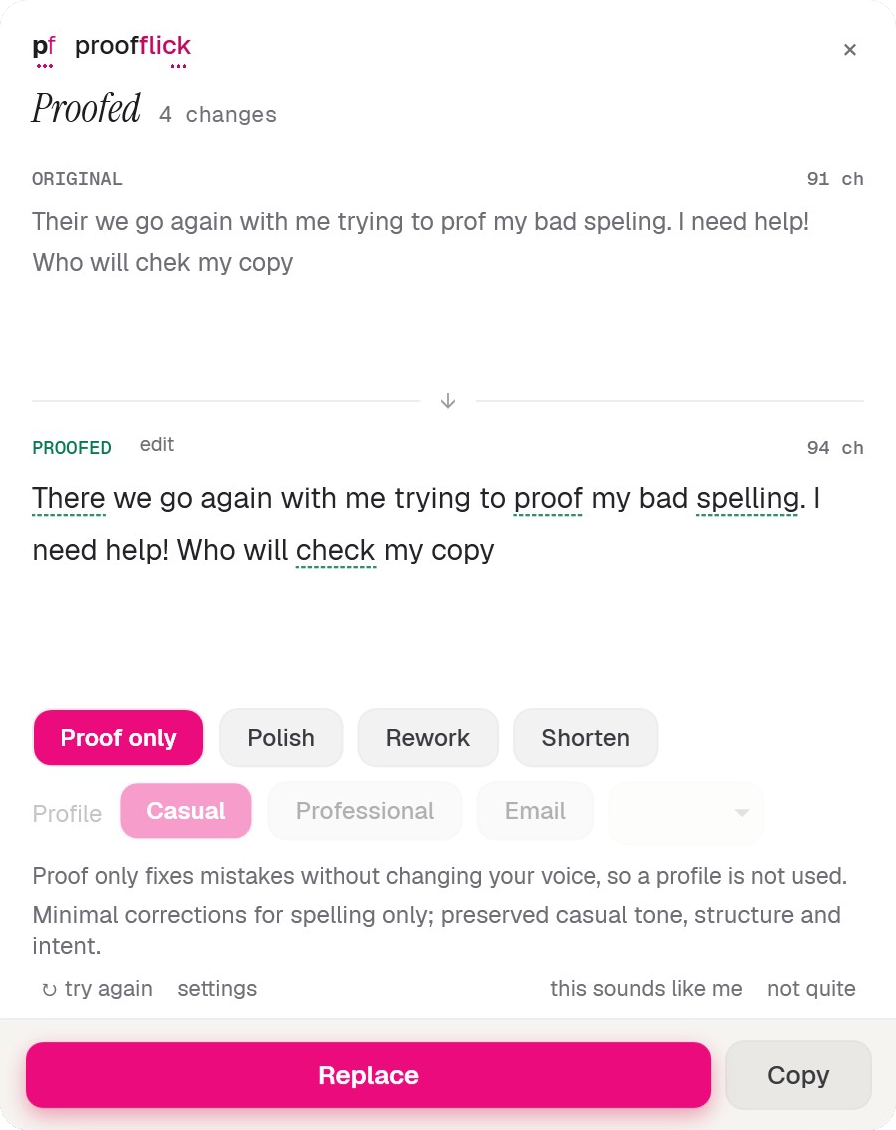
The ProofFlick proof panel. The original sentence sits above the proofread version with every change marked, mode buttons for Proof only, Polish, Rework and Shorten, and Replace and Copy actions.
What it does

It does two things, everywhere you type.

Grammarly proofreads. Wispr Flow dictates. ProofFlick does both, in one quiet app that lives in your system tray and works in whatever field your cursor is already in.

Proofread

Fix writing where it stands

Select text in any app and press the shortcut. ProofFlick shows your original next to the corrected version, marks every change, and tells you why. Replace it in place, or copy it. Nothing is ever rewritten without you seeing exactly what changed.

Ctrl+Shift+5 proofread selection

Dictate

Speak, get clean text

Press the shortcut and talk. Your speech lands as clean text, typed straight into whatever you were working in: an email, a Slack thread, a commit message, a document. No separate window to dictate into and paste from.

Ctrl+Win+Space start dictating

Writing profiles

It sounds like you, not like a robot

ProofFlick learns your writing style, so corrections read like you on a good day. Set up profiles for the places your writing goes: professional for email, casual for chat, and switch on the panel itself.

Anywhere you type

One shortcut away, in every app.

There is no editor to paste into and no browser tab to keep open. ProofFlick sits in the system tray and works directly in the field you are typing in, including the places other writing tools break: IDEs, terminals and coding tools.

Browsers Email Slack Word IDEs Terminals
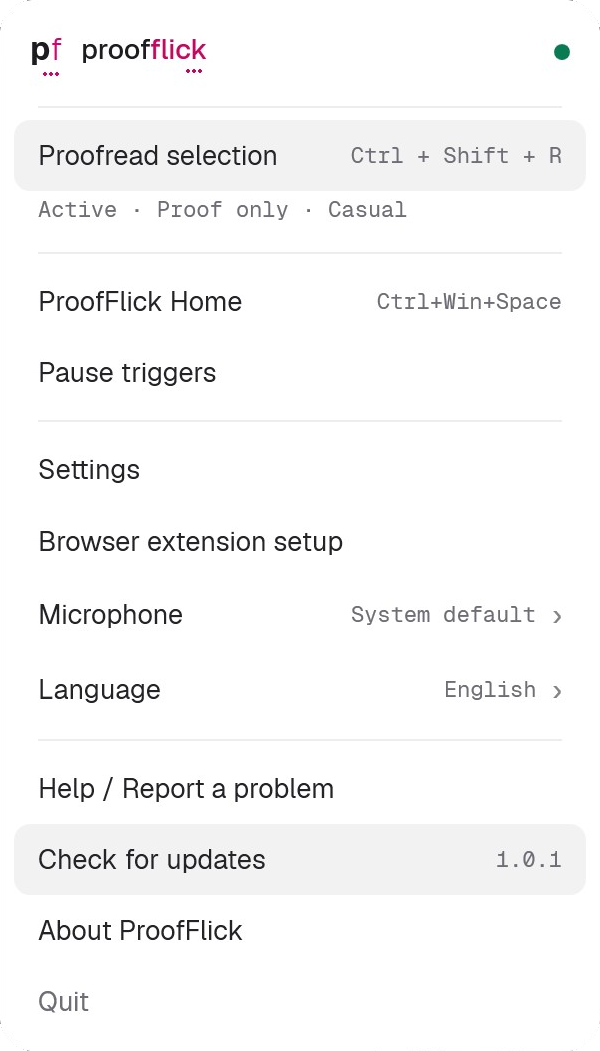
The ProofFlick tray flyout, showing the proofread and dictate shortcuts alongside the active writing profile.
The whole app, from your tray
Privacy by architecture

We can’t leak your writing. We never receive it.

Every mainstream writing assistant routes your words through its own servers. ProofFlick has no servers in that path. Your text and audio go directly from your PC to the AI provider you chose, encrypted, under your own key. That is not a policy we promise to follow; it is how the app is built.

Where you write Your PC

ProofFlick, your API key, and your encrypted local history. Everything stays here.

Where it’s processed Your AI provider

OpenAI, Claude, Grok, OpenRouter or Groq. Your account, your terms, your choice.

ProofFlick servers Not in the path. Nothing to leak.
  • Runs only when you trigger it. ProofFlick is never a background collector, keylogger or clipboard logger.
  • Nothing is retained. Selected text is processed transiently, solely to produce the correction, and never kept after the request.
  • History stays home. Proofreads and dictations are kept on your device only, encrypted. Turn history off or delete it any time.
  • Keys never leave. Your API keys are encrypted with Windows DPAPI under your account and never leave your machine.
  • No telemetry. The app reports nothing about you or your writing to anyone. Neither does this website.
  • Plain-English policy. The privacy policy is short and readable, because there is very little to disclose.
The maths

Two subscriptions, or one purchase.

Compared on ProofFlick Grammarly Pro Wispr Flow Pro
Proofreading ×
Dictation ×
Works in IDEs and terminals × ×
Bring your own AI key × ×
Your text bypasses the vendor’s servers × ×
One-time purchase × ×
Price $39.99 once $30 / month
or $144 / year
$15 / month
or $144 / year

Published US list prices for individual paid plans, checked 28 July 2026. Check theirs; ours is $39.99, once.

$288 every year, forever vs $39.99 once

Grammarly Pro is $144 a year. Wispr Flow Pro is $144 a year. Keep both and you pay that again every year you go on writing. ProofFlick is $39.99 once at launch, $99.99 after, and then never again, plus the $1 to $3 a month you pay your AI provider directly. On Groq’s free tier, that part is $0.

The app

A record of every fix, kept on your machine.

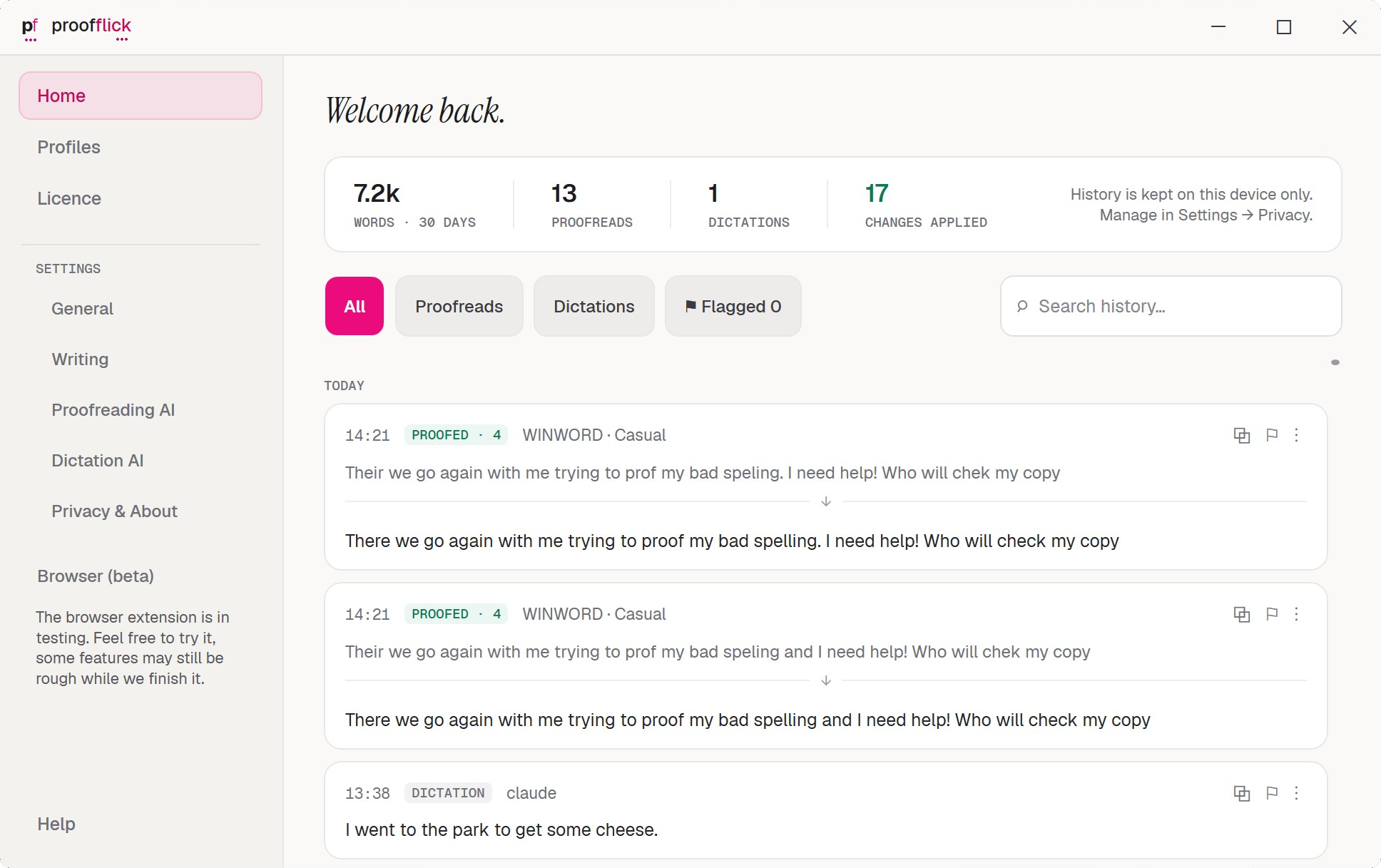
The home window keeps a searchable history of your proofreads and dictations: stored locally, encrypted, never synced anywhere. Flag a bad correction to refine your profile, copy an old dictation, or switch history off entirely.

The ProofFlick home window with a searchable history of past proofreads and dictations, and a line reading: History is kept on this device only.
“History is kept on this device only”, in the app’s own words
Why this exists

“I built the tool I needed, because renting it twice was absurd.”

I’m Steve. I’m dyslexic, and I write all day: email, briefs, code, scripts. For years I paid Grammarly to fix my writing and Wispr Flow to type it for me. Both are good tools. Both charge every month. And both work by sending everything I write to their servers.

I got tired of renting two tools that should be one, and tired of my words leaving my machine just to get corrected. So I built ProofFlick: one app, one price, my own AI key, and my writing goes to my provider and nowhere else.

It runs on my PC every day. If you write on Windows, I think it will earn its $39.99.

Steve Farah Capital Films Limited, London

Pricing

Try it free. Keep it for $39.99.

Launch offer
$39.99 $99.99

One-time purchase, in US dollars. Not a subscription, nothing renews.

  • Proofreading and dictation in every app
  • Writing profiles that learn your style
  • Local, encrypted history and no telemetry
  • Works with OpenAI, Claude, Grok, OpenRouter and Groq
  • 3 devices, with deactivation to move a licence
  • 14 days free before you decide, no card
Download free 14 days free · no card · Windows 10 & 11 Buy now · $39.99 $99.99 One-time. No subscription.

Buying opens shortly. Start with the free trial above; the launch price will be here when you are ready.

Purchases are handled by Lemon Squeezy as merchant of record. Sold by Capital Films Limited, company number 07426603.

Plus your AI provider

Running costs stay yours, and stay small

You connect your own API key, and your provider bills you at cost for what you actually use. For typical daily writing that comes to about $1 to $3 a month, often less. None of it goes to us.

Or run it for $0: Groq has a genuinely free tier, no credit card required.
OpenAI Claude Grok OpenRouter Groq
macOS

ProofFlick is Windows-only today.

A Mac version is coming later. It has not been started and there is no date, so rather than promise one: leave your email and we will tell you when it actually exists. That is the only thing it will be used for.

Coming to macOS: get notified

Your ProofFlick licence covers ProofFlick on Windows. A macOS version, if it ships, is a separate product and is not included.

Questions

Asked and answered.

What does “bring your own key” mean?

ProofFlick doesn’t resell AI access. You create an account with a provider you trust, paste one API key into ProofFlick during setup, and from then on your text goes directly from your PC to that provider. They bill you at cost, typically $1 to $3 a month for daily use. Groq’s free tier needs no credit card at all.

Is it hard to set up?

No. Install, pick a provider, paste the key, done. The app walks you through it on first run, and Groq is a good place to start because the free tier means there is nothing to pay and nothing to configure beyond the key itself.

Where does my writing actually go?

From your PC, over an encrypted connection, to the provider you chose, under your own account and their terms. It never touches ProofFlick servers, because there are none in the path. Your history stays on your device, encrypted, and the app sends no telemetry.

How many computers can I use it on?

Three. A licence activates on up to 3 devices, and you can deactivate one to free the slot if you replace a machine.

What happens when the trial ends?

You get the full app for 14 days, with no card. After that it asks you to buy a licence to keep using it: $99.99 one-time, or $39.99 while the launch offer lasts. No auto-renewal, nothing to cancel.

Is there a Mac or mobile version?

Not yet. ProofFlick is a Windows 10 and 11 desktop app, and that focus is why it works everywhere on Windows, from browsers to terminals. A Mac version is coming later.

Try it on your own writing.

Fourteen days free, in every app you already use. No subscription waiting at the end of it.